> ## Documentation Index
> Fetch the complete documentation index at: https://docs.thoughtly.com/llms.txt
> Use this file to discover all available pages before exploring further.
# User menu
> Use the Thoughtly user menu to view your profile and credit balance, switch theme, access quick links to settings and support, and sign out of the platform.
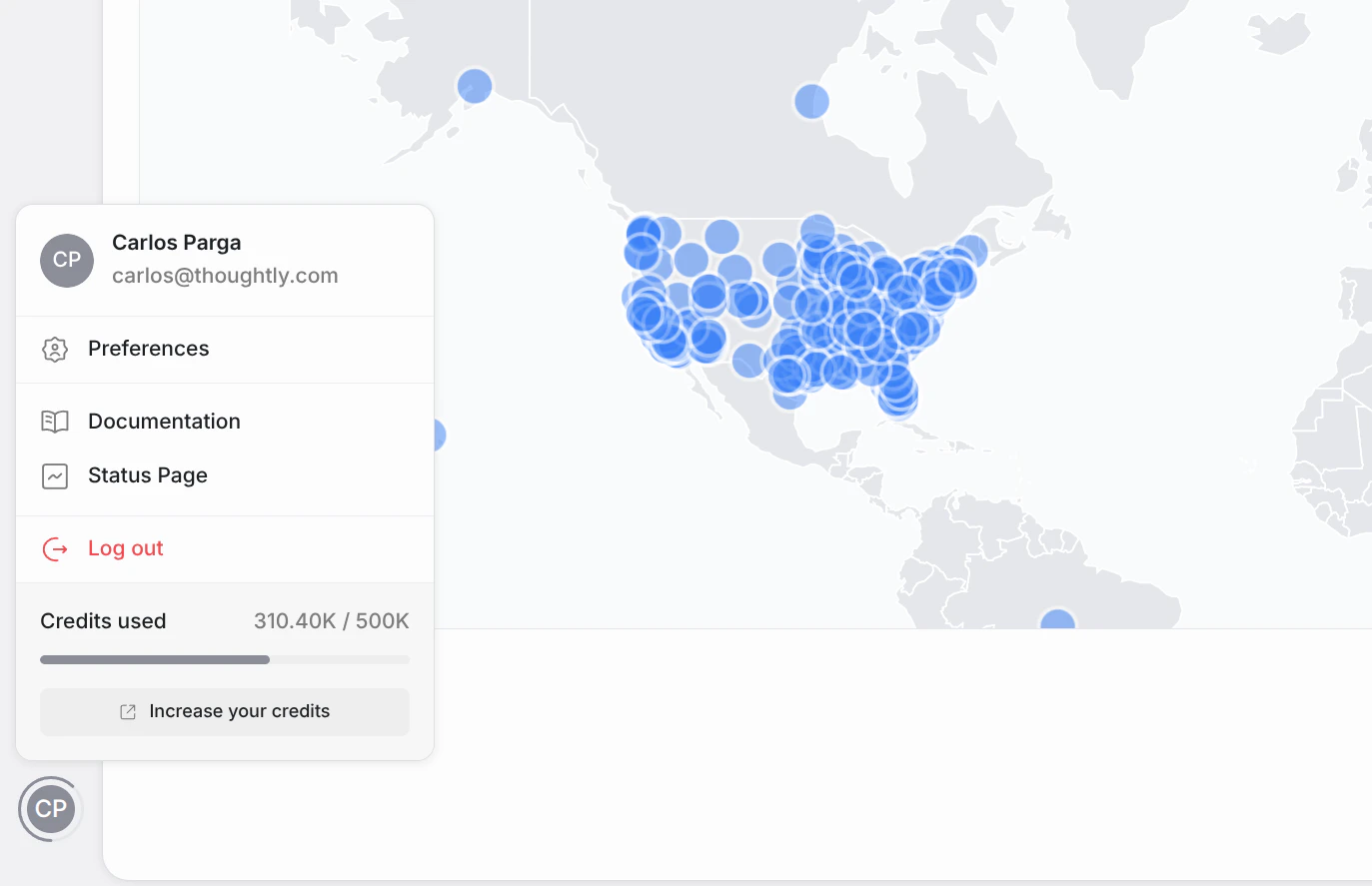
The User Menu provides quick access to your account settings and helpful resources. Click your **user avatar** in the navigation to open it.
 ## What you'll see
| Item | Description |
| ----------------------- | ------------------------------------------------------------------------------------------------------- |
| **User Info** | Your name and email displayed at the top. |
| **Preferences** | Opens the Profile Modal to edit your personal details. |
| **Product Roadmap** | External link to the Thoughtly product roadmap. |
| **Help Center** | External link to this documentation site. |
| **Community** | External link to the [Thoughtly Skool Community](https://www.skool.com/thoughtly). |
| **Status Page** | External link to the platform status page. |
| **Remaining Credits** | Your current credit balance with a visual progress bar. |
| **Top up your balance** | Navigates to [Settings → Subscription](/platform/settings/subscription) to purchase additional credits. |
## Profile Modal
Clicking **Preferences** opens a modal where you can manage your personal profile. This is a lightweight overlay — it does not navigate to a new page.
## What you'll see
| Item | Description |
| ----------------------- | ------------------------------------------------------------------------------------------------------- |
| **User Info** | Your name and email displayed at the top. |
| **Preferences** | Opens the Profile Modal to edit your personal details. |
| **Product Roadmap** | External link to the Thoughtly product roadmap. |
| **Help Center** | External link to this documentation site. |
| **Community** | External link to the [Thoughtly Skool Community](https://www.skool.com/thoughtly). |
| **Status Page** | External link to the platform status page. |
| **Remaining Credits** | Your current credit balance with a visual progress bar. |
| **Top up your balance** | Navigates to [Settings → Subscription](/platform/settings/subscription) to purchase additional credits. |
## Profile Modal
Clicking **Preferences** opens a modal where you can manage your personal profile. This is a lightweight overlay — it does not navigate to a new page.
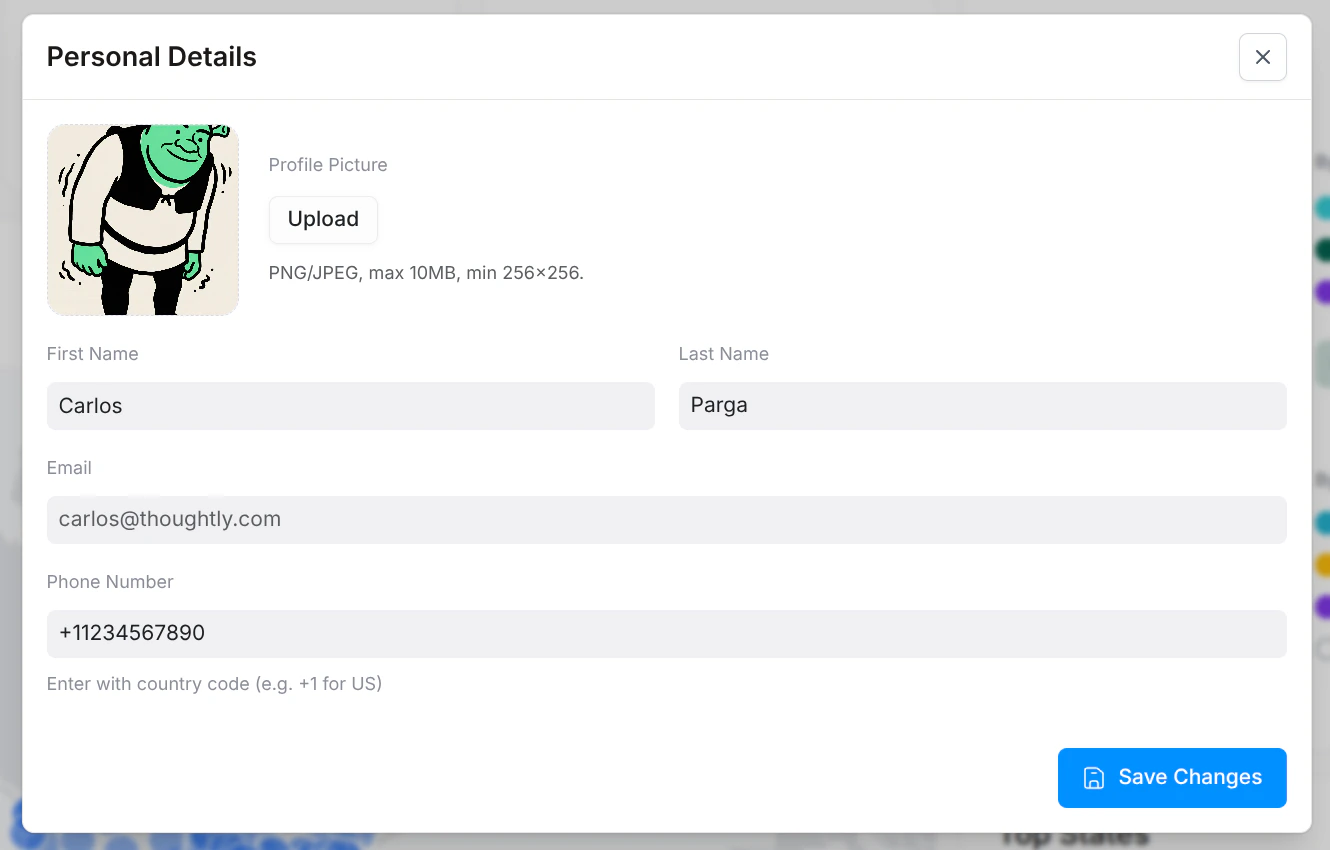 | Field | Type | Description |
| ------------------- | ------------ | -------------------------------------------------------------------------------------------- |
| **Profile Picture** | Image upload | Your profile picture (JPG, PNG, or GIF). |
| **First Name** | Text input | Your first name (e.g., "Jane"). |
| **Last Name** | Text input | Your last name (e.g., "Doe"). |
| **Email** | Read-only | Your login email address. Cannot be changed. |
| **Phone Number** | Phone input | Used for account verification and "Call Me" testing. Include country code (e.g., +1 for US). |
User authentication and security (password changes, SSO, etc.) are handled by Wristband and are not part of the Thoughtly settings interface.
## See also
* [Settings → Subscription](/platform/settings/subscription) — manage your plan and credits
* [Workspace Switcher](/platform/workspace-switcher) — switch between workspaces
| Field | Type | Description |
| ------------------- | ------------ | -------------------------------------------------------------------------------------------- |
| **Profile Picture** | Image upload | Your profile picture (JPG, PNG, or GIF). |
| **First Name** | Text input | Your first name (e.g., "Jane"). |
| **Last Name** | Text input | Your last name (e.g., "Doe"). |
| **Email** | Read-only | Your login email address. Cannot be changed. |
| **Phone Number** | Phone input | Used for account verification and "Call Me" testing. Include country code (e.g., +1 for US). |
User authentication and security (password changes, SSO, etc.) are handled by Wristband and are not part of the Thoughtly settings interface.
## See also
* [Settings → Subscription](/platform/settings/subscription) — manage your plan and credits
* [Workspace Switcher](/platform/workspace-switcher) — switch between workspaces