> ## Documentation Index
> Fetch the complete documentation index at: https://docs.thoughtly.com/llms.txt
> Use this file to discover all available pages before exploring further.
# Call and conversation history
> View, filter, and search every voice call and conversation handled by your Thoughtly agents, with transcripts, recordings, outcomes, and per-call analytics.
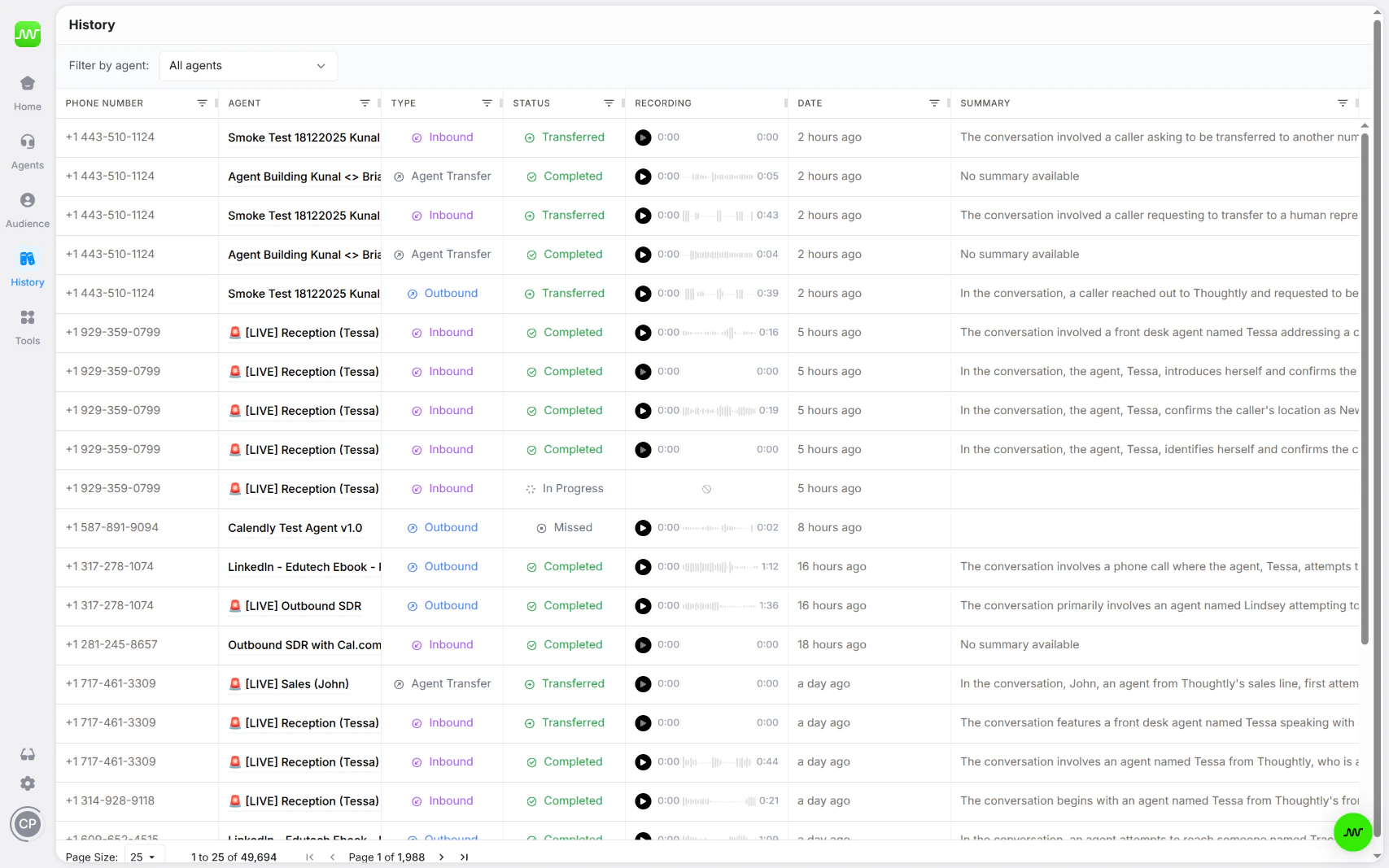
History is the global log of all interactions across all of your agents. Access it from the **History** tab in the primary navigation.
 ## What you'll find
History provides a single, filterable view of every call, message, and interaction handled by your agents. Use it to:
* Review call recordings and transcripts
* Monitor agent performance across your entire workspace
* Filter by agent, date range, outcome, or other criteria
* Drill into individual interactions for full detail
## Filtering by agent
When you click the **Responses** tab inside the Agent Builder, you are redirected to History with a filter pre-applied for that specific agent. This lets you quickly see all interactions for a single agent without leaving your workflow.
You can also manually filter History by agent at any time using the filter controls at the top of the page.
## History vs. Timeline
History and the contact Timeline serve different purposes:
| View | Question it answers | Where to find it |
| ---------------------------- | ------------------------------------------ | ------------------------------------- |
| **History** | "What happened across my business?" | Primary navigation → History |
| **Timeline** *(coming soon)* | "What happened with this specific person?" | Audiences → Contact Detail → Timeline |
## See also
* [Audiences](/platform/audiences) — manage contacts in the Audiences table
* [Agent Builder](/agents/overview) — build and configure agents
* [Automations](/automations/getting-started) — trigger workflows based on call outcomes
## Call statuses
History uses statuses to distinguish what happened to each interaction.
| Status | Meaning |
| -------------- | ------------------------------------------------------------ |
| Completed | The interaction finished normally. |
| In Progress | The interaction is currently active. |
| Not Started | The interaction was queued but has not connected. |
| Failed | The interaction encountered an error. |
| Suppressed | The interaction was blocked by consent or suppression rules. |
| No Answer | The call was placed but not answered. |
| Left Voicemail | The agent reached voicemail and left a message. |
| Transferred | The call transferred to a human or external number. |
| Busy | The recipient line was busy. |
| Canceled | The interaction was canceled before connection. |
A completed call is not always a successful business outcome. Use outcomes, tags, variables, and analytics to measure what matters for your workflow.
## Filtering and search
Use filters to find calls and messages by agent, status, call type, date, tags, phone number, summary, or other available fields. Multiple filters narrow the result set.
## Export history
Use **Export** to download filtered History results for reporting or review.
1. Apply the filters you want.
2. Click **Export**.
3. Confirm if exporting a large result set.
4. Wait for the export to finish.
5. Download the CSV or use the emailed export link where available.
For large exports, Thoughtly may show progress and deliver the file by email when complete.
## What you'll find
History provides a single, filterable view of every call, message, and interaction handled by your agents. Use it to:
* Review call recordings and transcripts
* Monitor agent performance across your entire workspace
* Filter by agent, date range, outcome, or other criteria
* Drill into individual interactions for full detail
## Filtering by agent
When you click the **Responses** tab inside the Agent Builder, you are redirected to History with a filter pre-applied for that specific agent. This lets you quickly see all interactions for a single agent without leaving your workflow.
You can also manually filter History by agent at any time using the filter controls at the top of the page.
## History vs. Timeline
History and the contact Timeline serve different purposes:
| View | Question it answers | Where to find it |
| ---------------------------- | ------------------------------------------ | ------------------------------------- |
| **History** | "What happened across my business?" | Primary navigation → History |
| **Timeline** *(coming soon)* | "What happened with this specific person?" | Audiences → Contact Detail → Timeline |
## See also
* [Audiences](/platform/audiences) — manage contacts in the Audiences table
* [Agent Builder](/agents/overview) — build and configure agents
* [Automations](/automations/getting-started) — trigger workflows based on call outcomes
## Call statuses
History uses statuses to distinguish what happened to each interaction.
| Status | Meaning |
| -------------- | ------------------------------------------------------------ |
| Completed | The interaction finished normally. |
| In Progress | The interaction is currently active. |
| Not Started | The interaction was queued but has not connected. |
| Failed | The interaction encountered an error. |
| Suppressed | The interaction was blocked by consent or suppression rules. |
| No Answer | The call was placed but not answered. |
| Left Voicemail | The agent reached voicemail and left a message. |
| Transferred | The call transferred to a human or external number. |
| Busy | The recipient line was busy. |
| Canceled | The interaction was canceled before connection. |
A completed call is not always a successful business outcome. Use outcomes, tags, variables, and analytics to measure what matters for your workflow.
## Filtering and search
Use filters to find calls and messages by agent, status, call type, date, tags, phone number, summary, or other available fields. Multiple filters narrow the result set.
## Export history
Use **Export** to download filtered History results for reporting or review.
1. Apply the filters you want.
2. Click **Export**.
3. Confirm if exporting a large result set.
4. Wait for the export to finish.
5. Download the CSV or use the emailed export link where available.
For large exports, Thoughtly may show progress and deliver the file by email when complete.