> ## Documentation Index
> Fetch the complete documentation index at: https://docs.thoughtly.com/llms.txt
> Use this file to discover all available pages before exploring further.
# Attributes vs metadata in automations
> Understand the difference between contact attributes and call metadata in Thoughtly so you know what data persists on a contact and what lives per call.
export const NextSection = ({title, icon, href, description}) =>
{description}
;
If you have built an agent already, you know about **in-agent variables** (from ***Variables*** extraction and mid-call ***Actions*** inside the Agent Builder). Automations add two more ways to pass data into calls and keep it around across calls: **Metadata** and **Attributes**.
| Feature | **Metadata** 📝 | **Attributes** 💾 |
| ------------------- | --------------------------------------------------- | ------------------------------------------ |
| **Scope** | Single call only | Persistent on contact |
| **Lifespan** | Temporary (discarded after call) | Permanent (survives across calls) |
| **Use cases** | Campaign labels, A/B testing, call-specific context | Customer preferences, status, demographics |
| **Set from** | Automation steps (Call Phone Number, Call Contact) | Automations, API, manual contact updates |
| **Access in agent** | `{{metadata.VARIABLE_NAME}}` | `{{attributes.VARIABLE_NAME}}` |
| **Example** | `campaign: "summer_promo"` | `preferred_language: "spanish"` |
| **Think of it as** | A sticky note on this one call | A sticky note on the contact record |
Think of them like sticky notes:
* **Metadata** = a sticky note **on this one call**. Use it, then toss it.
* **Attributes** = a sticky note **on the contact**. It stays for future calls.
## Metadata - short-lived, per-call context
You add **Metadata** in an automation step that **places a call** (***Call Phone Number*** or ***Call Contact***). It travels only with that call.
**When to use**
* Campaign labels you do not need long term (for example `campaign`, `utm_source`)
* A/B variant flags (for example `script_version: "B"`)
* Temporary hints just for the agent (for example `priority: 2`, `intent: "book_demo"`)
**Reference inside the agent**
```
{{metadata.VARIABLE_NAME}}
```
Example: `{{metadata.campaign}}` -> `q4`
**Set from automations**
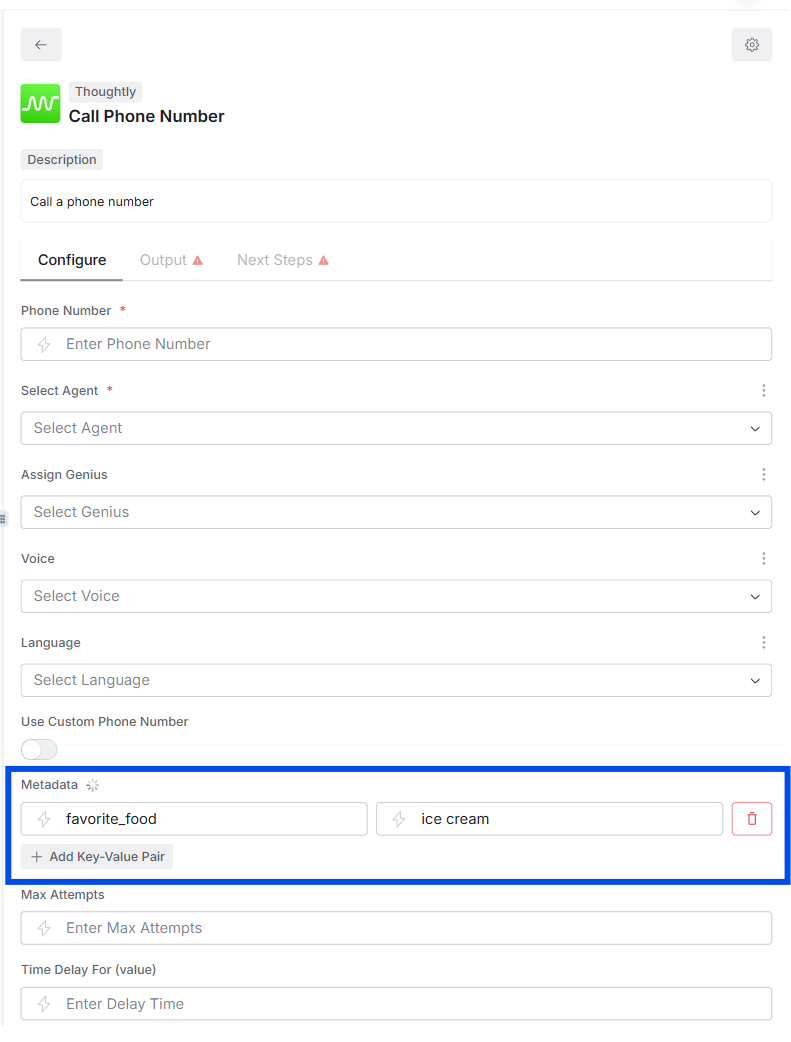 In **Call Phone Number** or **Call Contact**, add a JSON object in **Metadata**:
```json theme={null}
{"campaign": "q4", "intent": "book_demo", "priority": 2}
```
**Lifecycle**
* Exists during the call only.
* Not written back to the contact automatically.
* If you want to keep it, log a summary or copy values into **Attributes** after the call.
## Attributes - persistent facts about a contact
**Attributes** live on the **Thoughtly Contact** record. They are created or updated by steps like **Create or Update Contact** or **Add Attributes to Contact**.
**When to use**
* Traits you will reuse: `region`, `plan`, `lifetime_value`, `last_booking_at`
* Routing decisions across many calls: `vip: true`, `do_not_call_until: "2025-11-01"`
* Data you need available for inbound logic (see [On Inbound Call](/automations/triggers#thoughtly-on-inbound-call))
**Reference inside the agent**
```
{{system.contact.attributes.ATTRIBUTE_NAME}}
```
Examples:
* `{{system.contact.attributes.region}}` -> `EU Central`
* `{{system.contact.attributes.vip}}` -> `true`
**Set from automations**
In **Call Phone Number** or **Call Contact**, add a JSON object in **Metadata**:
```json theme={null}
{"campaign": "q4", "intent": "book_demo", "priority": 2}
```
**Lifecycle**
* Exists during the call only.
* Not written back to the contact automatically.
* If you want to keep it, log a summary or copy values into **Attributes** after the call.
## Attributes - persistent facts about a contact
**Attributes** live on the **Thoughtly Contact** record. They are created or updated by steps like **Create or Update Contact** or **Add Attributes to Contact**.
**When to use**
* Traits you will reuse: `region`, `plan`, `lifetime_value`, `last_booking_at`
* Routing decisions across many calls: `vip: true`, `do_not_call_until: "2025-11-01"`
* Data you need available for inbound logic (see [On Inbound Call](/automations/triggers#thoughtly-on-inbound-call))
**Reference inside the agent**
```
{{system.contact.attributes.ATTRIBUTE_NAME}}
```
Examples:
* `{{system.contact.attributes.region}}` -> `EU Central`
* `{{system.contact.attributes.vip}}` -> `true`
**Set from automations**
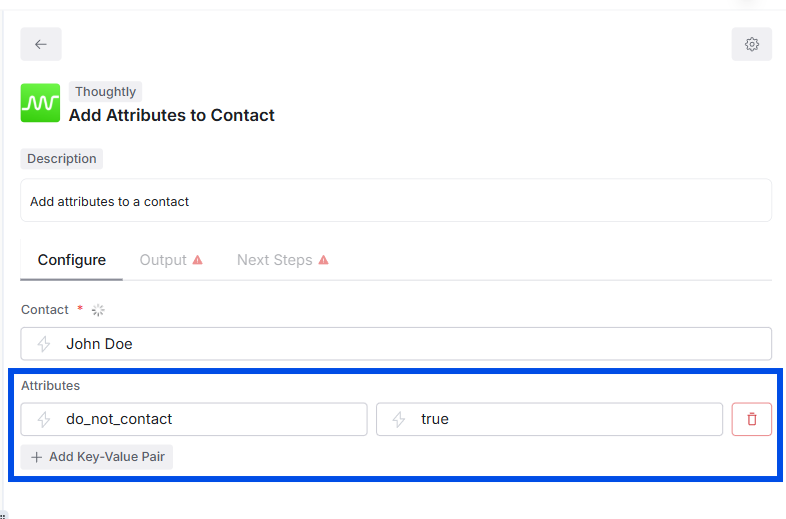 Use **Create or Update Contact** (upsert) or **Add Attributes to Contact**.
Example payload:
```json theme={null}
{"vip": true, "plan": "pro", "lifetime_value": 12450}
```
**Lifecycle**
* Sticks to the contact across all future calls (outbound and inbound).
* Overwrites on the next update if you send the same key.
## How they work together
A practical sequence might look like this:
1. ***Webhook*** trigger arrives with `{ phone, intent }`.
2. **Create or Update Contact** -> set Attributes `{source:"ads", region:"US"}`.
3. **Call Contact** with Metadata `{intent:"book_demo", campaign:"q4"}`.
4. Inside the agent prompt:
* "If `{{metadata.intent}}` is `book_demo`, offer times."
* "Mention support region `{{system.contact.attributes.region}}`."
5. Post-call (***On Call Completed*** automation, scoped to one agent, multiple agents, or All Agents):
* Write `last_called_at` and `last_outcome` as Attributes for reporting.
## Quick Do / Don't
**Do**
* Use **Metadata** to carry per-call flags (campaign, test group, intent, priority).
* Use **Attributes** for facts you will reuse (segment, plan, consent timestamps).
* Name keys in `lower_snake_case` (campaign, last\_purchase\_at).
* Keep values simple: strings, numbers, booleans, ISO dates.
**Don't**
* Do not store PII you do not need.
* Do not rely on Metadata to be available on future calls; it will not be.
* Do not pack huge JSON blobs into Attributes; keep them concise.
## Common patterns
* **Campaign calls:** Metadata `{campaign:"spring"}` + Attribute `last_called_at`
* **A/B testing:** Metadata `{variant:"B"}` + Attribute `last_variant:"B"` (for long-term tracking)
* **Inbound readiness:** Attributes `{plan:"pro", vip:true}` set ahead of time so inbound routing is instant
* **Compliance:** Attributes `{consent_sms:true, consent_recorded_at:"2025-10-07"}`
## FAQ
**Can I copy Metadata into Attributes?**\
Yes. After the call (***On Call Completed***), add a step to write selected Metadata keys into Attributes.
**Which wins if both exist?**\
They do not conflict. Metadata is read-only to the call; Attributes live on the contact. If both define something like `priority`, your prompt decides which to honor.
**Where do I see them?**\
Metadata appears in call context and logs. Attributes show on the contact record and can be searched or filtered.
## See also
* [Variables](/agents/variables) - in-agent extraction and prompts
* [Automations - Steps](/automations/actions) - call steps where you set Metadata and Attributes
* [Automations - Triggers](/automations/triggers) - where automations start
* [Automations overview](/automations/getting-started) - write results back into Attributes for reporting
Use **Create or Update Contact** (upsert) or **Add Attributes to Contact**.
Example payload:
```json theme={null}
{"vip": true, "plan": "pro", "lifetime_value": 12450}
```
**Lifecycle**
* Sticks to the contact across all future calls (outbound and inbound).
* Overwrites on the next update if you send the same key.
## How they work together
A practical sequence might look like this:
1. ***Webhook*** trigger arrives with `{ phone, intent }`.
2. **Create or Update Contact** -> set Attributes `{source:"ads", region:"US"}`.
3. **Call Contact** with Metadata `{intent:"book_demo", campaign:"q4"}`.
4. Inside the agent prompt:
* "If `{{metadata.intent}}` is `book_demo`, offer times."
* "Mention support region `{{system.contact.attributes.region}}`."
5. Post-call (***On Call Completed*** automation, scoped to one agent, multiple agents, or All Agents):
* Write `last_called_at` and `last_outcome` as Attributes for reporting.
## Quick Do / Don't
**Do**
* Use **Metadata** to carry per-call flags (campaign, test group, intent, priority).
* Use **Attributes** for facts you will reuse (segment, plan, consent timestamps).
* Name keys in `lower_snake_case` (campaign, last\_purchase\_at).
* Keep values simple: strings, numbers, booleans, ISO dates.
**Don't**
* Do not store PII you do not need.
* Do not rely on Metadata to be available on future calls; it will not be.
* Do not pack huge JSON blobs into Attributes; keep them concise.
## Common patterns
* **Campaign calls:** Metadata `{campaign:"spring"}` + Attribute `last_called_at`
* **A/B testing:** Metadata `{variant:"B"}` + Attribute `last_variant:"B"` (for long-term tracking)
* **Inbound readiness:** Attributes `{plan:"pro", vip:true}` set ahead of time so inbound routing is instant
* **Compliance:** Attributes `{consent_sms:true, consent_recorded_at:"2025-10-07"}`
## FAQ
**Can I copy Metadata into Attributes?**\
Yes. After the call (***On Call Completed***), add a step to write selected Metadata keys into Attributes.
**Which wins if both exist?**\
They do not conflict. Metadata is read-only to the call; Attributes live on the contact. If both define something like `priority`, your prompt decides which to honor.
**Where do I see them?**\
Metadata appears in call context and logs. Attributes show on the contact record and can be searched or filtered.
## See also
* [Variables](/agents/variables) - in-agent extraction and prompts
* [Automations - Steps](/automations/actions) - call steps where you set Metadata and Attributes
* [Automations - Triggers](/automations/triggers) - where automations start
* [Automations overview](/automations/getting-started) - write results back into Attributes for reporting