> ## Documentation Index
> Fetch the complete documentation index at: https://docs.thoughtly.com/llms.txt
> Use this file to discover all available pages before exploring further.
# Outcomes and conversation branching
> Define outcomes that decide where a Thoughtly voice agent routes the conversation after each caller response, enabling dynamic branching and follow-ups.
export const NextSection = ({title, icon, href, description}) =>
{description}
;
**Prerequisites**: Complete [Agent Builder Overview](/agents/overview) and [Nodes](/agents/nodes) first.
Outcomes tell your agent **where to go next** after a caller speaks. Clear outcomes mean smooth navigation; think of them as written playbooks that ensure your agent always knows what to do.
Add outcomes from the right panel of a [Speak node](/agents/nodes#speak-node). Open the node, scroll to **Outcomes**, and click **Add outcome**.
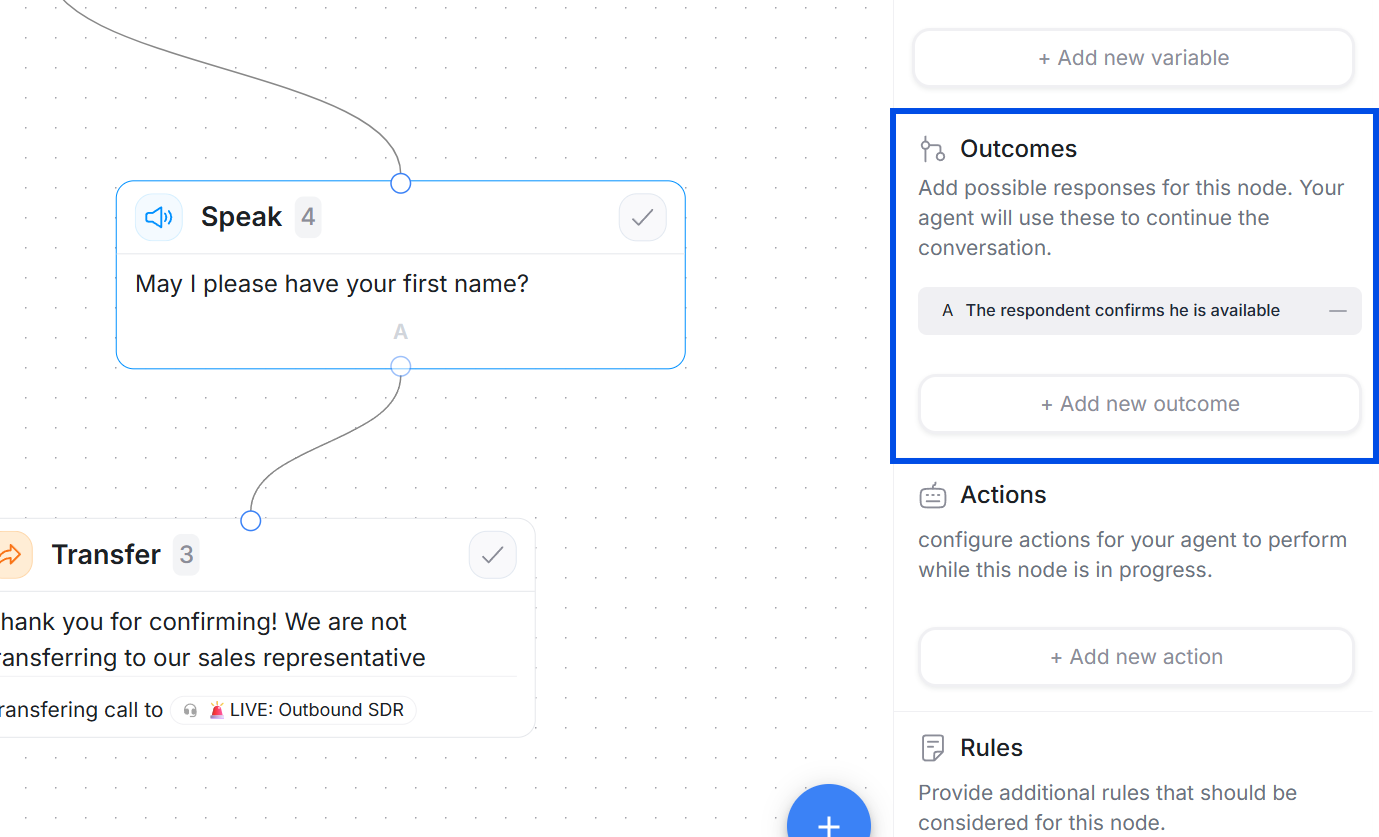 There are two outcome types:
1. **Prompt-based outcomes** (AI decides)
2. **Rule-based outcomes** (deterministic checks)
A node can use either prompt-based or rule-based outcomes, not both. Pick the mode that fits the scenario.
### Comparison: Prompt-based vs Rule-based
| Feature | Prompt-based | Rule-based |
| ---------------------- | ----------------------------------- | ------------------------------- |
| **Decision Maker** | AI interprets intent | Exact logical conditions |
| **Best For** | Open-ended replies, varied phrasing | Structured data, yes/no answers |
| **Accuracy** | Flexible interpretation | 100% deterministic |
| **Setup Complexity** | Write clear labels | Define logical rules |
| **Maintenance** | Rename labels to clarify | Reorder rules carefully |
| **Ambiguity Handling** | Interprets closest match | Requires exact match or Else |
| **Use Case** | "Interested or not?" | "Email valid? Budget > \$250k?" |
| **Compliance** | ⚠️ Not recommended | ✅ Required for critical paths |
## Prompt-based outcomes (AI)
**What it does:** After the caller responds, Thoughtly evaluates the reply with AI and selects the best matching outcome.
**When to use:**
* Interpreting open-ended replies (interest level, objections, next-step intent)
* Handling varied phrasing where exact keywords are unpredictable
There are two outcome types:
1. **Prompt-based outcomes** (AI decides)
2. **Rule-based outcomes** (deterministic checks)
A node can use either prompt-based or rule-based outcomes, not both. Pick the mode that fits the scenario.
### Comparison: Prompt-based vs Rule-based
| Feature | Prompt-based | Rule-based |
| ---------------------- | ----------------------------------- | ------------------------------- |
| **Decision Maker** | AI interprets intent | Exact logical conditions |
| **Best For** | Open-ended replies, varied phrasing | Structured data, yes/no answers |
| **Accuracy** | Flexible interpretation | 100% deterministic |
| **Setup Complexity** | Write clear labels | Define logical rules |
| **Maintenance** | Rename labels to clarify | Reorder rules carefully |
| **Ambiguity Handling** | Interprets closest match | Requires exact match or Else |
| **Use Case** | "Interested or not?" | "Email valid? Budget > \$250k?" |
| **Compliance** | ⚠️ Not recommended | ✅ Required for critical paths |
## Prompt-based outcomes (AI)
**What it does:** After the caller responds, Thoughtly evaluates the reply with AI and selects the best matching outcome.
**When to use:**
* Interpreting open-ended replies (interest level, objections, next-step intent)
* Handling varied phrasing where exact keywords are unpredictable
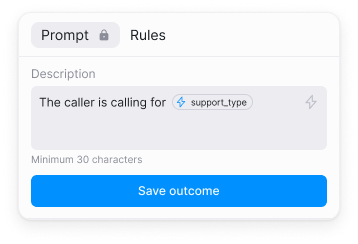 **How to write great outcomes:**
* **Be distinct.** Avoid overlapping labels such as "Positive" and "Very positive."
* **Be concrete.** Prefer "Wants appointment" over "Positive answer."
* **Be short.** Aim for 12-50 characters or one to two short sentences.
* **Cover common branches.** Skip tiny variations that sound the same.
**Common Mistake**: Using overlapping outcome labels like "Positive" and "Very Positive." The AI may struggle to distinguish them. Instead, use concrete labels: "Wants to book" vs "Interested, needs info."
**Example set:**
* Wants to book now
* Interested, send SMS link
* Not interested
* Busy - call back later
**Testing prompt outcomes:**
1. Draft three to five sample caller replies for each outcome.
2. Run test calls or the simulator and observe which path is chosen.
3. If outcomes collide, rename them to be more specific and retest.
Prompt outcomes pair best with a [Prompt speak node](/agents/nodes#2-prompt-speak-node), where your prompt already frames the agent's intent and tone.
## Rule-based outcomes (deterministic)
**What it does:** After the caller responds (or after an [Action](/agents/actions) runs), the system checks your rules from top to bottom and takes the first match. No AI is involved.
**When to use:**
* Branching based on structured info (yes/no answers, numbers, captured email)
* Navigating after Actions (lookup results, API flags, form validation)
* Enforcing critical logic where ambiguity is risky (compliance, verification, eligibility)
**How to write great outcomes:**
* **Be distinct.** Avoid overlapping labels such as "Positive" and "Very positive."
* **Be concrete.** Prefer "Wants appointment" over "Positive answer."
* **Be short.** Aim for 12-50 characters or one to two short sentences.
* **Cover common branches.** Skip tiny variations that sound the same.
**Common Mistake**: Using overlapping outcome labels like "Positive" and "Very Positive." The AI may struggle to distinguish them. Instead, use concrete labels: "Wants to book" vs "Interested, needs info."
**Example set:**
* Wants to book now
* Interested, send SMS link
* Not interested
* Busy - call back later
**Testing prompt outcomes:**
1. Draft three to five sample caller replies for each outcome.
2. Run test calls or the simulator and observe which path is chosen.
3. If outcomes collide, rename them to be more specific and retest.
Prompt outcomes pair best with a [Prompt speak node](/agents/nodes#2-prompt-speak-node), where your prompt already frames the agent's intent and tone.
## Rule-based outcomes (deterministic)
**What it does:** After the caller responds (or after an [Action](/agents/actions) runs), the system checks your rules from top to bottom and takes the first match. No AI is involved.
**When to use:**
* Branching based on structured info (yes/no answers, numbers, captured email)
* Navigating after Actions (lookup results, API flags, form validation)
* Enforcing critical logic where ambiguity is risky (compliance, verification, eligibility)
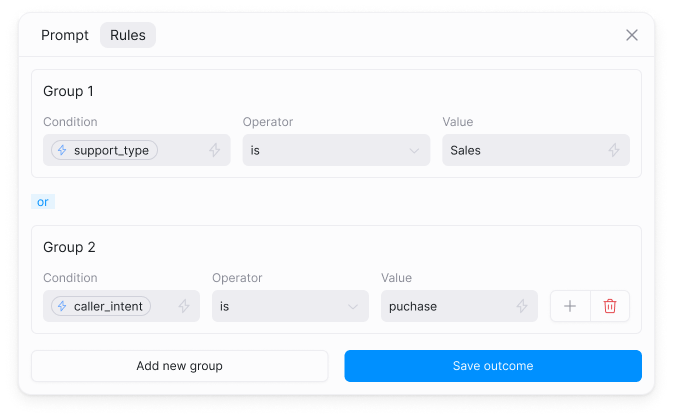 **How it is evaluated:**
* Outcomes are checked **from top to bottom** in the order you arrange them
* The **first matching rule wins** and routes to its connected node
* All subsequent rules are skipped once a match is found
* Always add a final **Else** (default) outcome to catch anything that doesn't match
**Reordering outcomes:** Hover over an outcome to reveal the drag handle icon. Click and drag to reorder outcomes. For rule-based outcomes, edge connections automatically update to reflect the new order.
**How it is evaluated:**
* Outcomes are checked **from top to bottom** in the order you arrange them
* The **first matching rule wins** and routes to its connected node
* All subsequent rules are skipped once a match is found
* Always add a final **Else** (default) outcome to catch anything that doesn't match
**Reordering outcomes:** Hover over an outcome to reveal the drag handle icon. Click and drag to reorder outcomes. For rule-based outcomes, edge connections automatically update to reflect the new order.
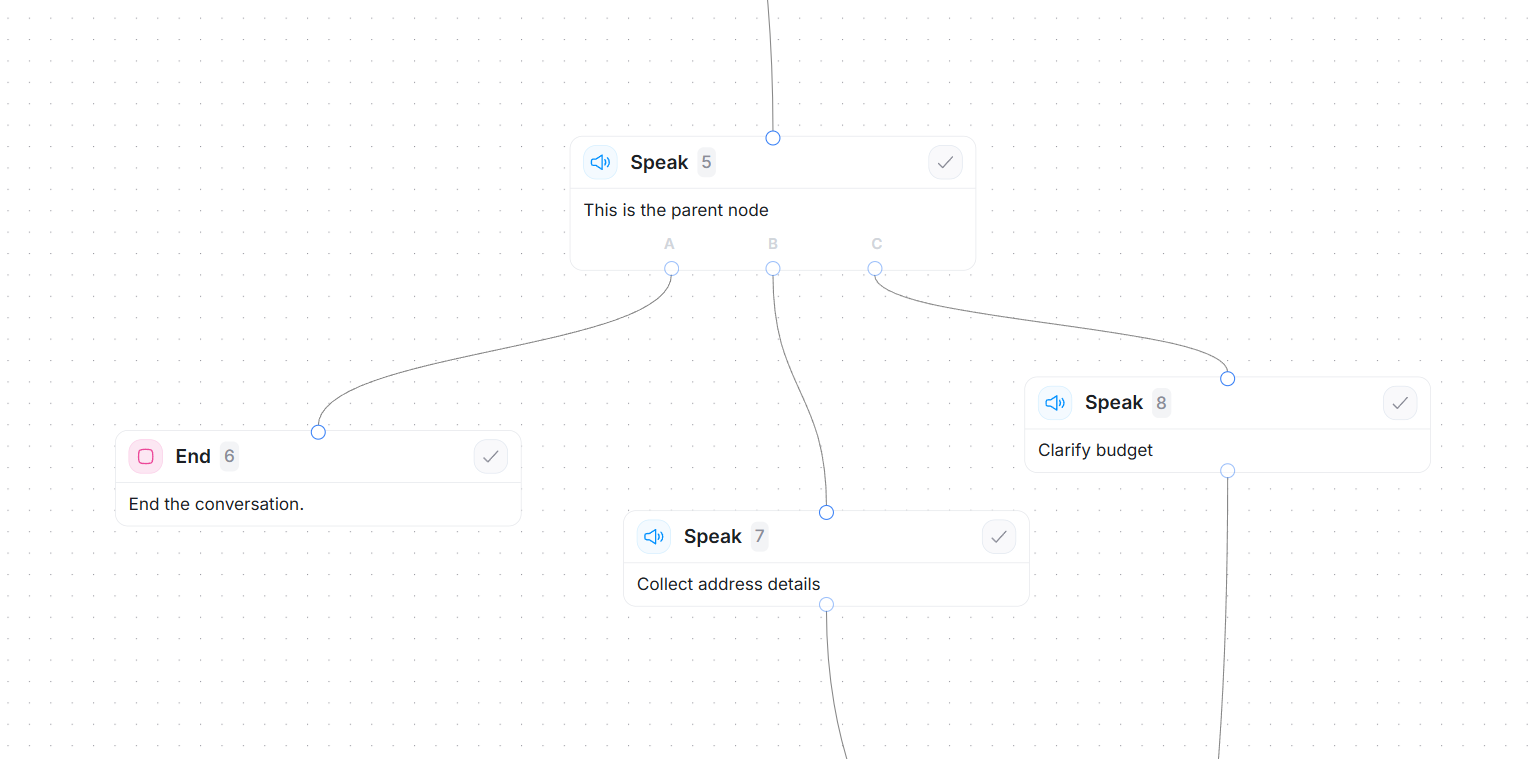 **Example: Email validation flow**
In the screenshot above, outcomes are evaluated top-to-bottom:
**Outcome A** (checked first)\
Rule: `caller_said_stop == true`\
→ Routes to: **End node** (conversation terminates)
**Outcome B** (checked second, only if A fails)\
Rule: `email_is_valid == true`\
→ Routes to: **Collect address details** (next step in happy path)
**Outcome C** (checked third, acts as Else/Default)\
Rule: Always matches if A and B both failed\
→ Routes to: **Clarify budget** (fallback to gather more info)
**Why order matters:** If you swap A and C, the "Clarify budget" path would always execute first (since Else always matches), and the agent would never check if the caller said stop.
**Common Mistake**: Forgetting the Else/Default outcome in rule-based routing. Always add a fallback to handle unexpected inputs or the agent will get stuck.
**Logic safety checklist:**
* Are rules mutually exclusive where needed?
* Is the most specific rule above the general ones?
* Do you have a final Else/Default outcome?
* Did you test negative and no-input cases?
## Loops (special use case)
You can loop an outcome back to the same node.
* Keep answering questions until the caller is satisfied.
* Re-ask or verify required information such as email or budget.
**Simple Q\&A loop (Prompt + prompt outcomes):**
1. Speak node -> Prompt: "Answer the caller's questions clearly and concisely. If the caller asks a new question, continue; if not, proceed."
2. Add two prompt-based outcomes:
* Caller asked a question -> connect back to this node (self-loop)
* No more questions -> go to the next step
3. Test with varied phrasing to confirm the loop works.
Add a maximum loop count or a fallback branch to avoid infinite loops. For required fields, pair the loop with rule checks (for example `email_is_valid == false`) so the agent retries with a clarifier or offers a [Transfer](/agents/nodes#transfer-node).
## Troubleshooting
**Outcomes not triggering correctly**
* Verify outcome type matches your use case (prompt for open-ended, rules for structured)
* Check that outcome labels are distinct and specific
* Test with varied caller responses using [Test Agent](/agents/testing)
**Agent gets stuck at a node**
* Ensure rule-based outcomes have an Else/Default path
* Verify all conditions are achievable (not logically impossible)
* Check that prompt outcomes have at least 2-3 options
**Wrong outcome chosen (prompt-based)**
* Rename outcomes to be more specific and concrete
* Add more example phrases in your testing
* Consider switching to rule-based if logic is too complex
**Rule order issues**
* Remember: first match wins in rule-based outcomes
* Move specific rules above general ones
* Test all branches with [Test Agent](/agents/testing)
## Common mistakes to avoid
* **Vague labels**: Using "Positive" instead of "Wants to book now" in prompt mode
* **Missing Else**: Forgetting the default fallback in rule-based outcomes creates [dead ends](/resources/glossary#dead-end)
* **Wrong order**: Placing general rules before specific ones causes incorrect matches
* **Compliance risk**: Using prompt outcomes for legal/medical/financial decisions where exactness matters
## See also
* [Speak nodes](/agents/nodes#speak-node) - choose Message vs. Prompt
* [Actions](/agents/actions) - mid-call steps that set flags and values
* [Variables](/agents/variables) - capture data for branching logic
* [Transfer node](/agents/nodes#transfer-node) - escalate to humans or other agents
* [End node](/agents/nodes#end-node) - finish conversations cleanly
* [Testing](/agents/testing) - validate outcome logic with Test Agent
* [Glossary: Happy Path](/resources/glossary#happy-path) - designing the ideal conversation flow
**Example: Email validation flow**
In the screenshot above, outcomes are evaluated top-to-bottom:
**Outcome A** (checked first)\
Rule: `caller_said_stop == true`\
→ Routes to: **End node** (conversation terminates)
**Outcome B** (checked second, only if A fails)\
Rule: `email_is_valid == true`\
→ Routes to: **Collect address details** (next step in happy path)
**Outcome C** (checked third, acts as Else/Default)\
Rule: Always matches if A and B both failed\
→ Routes to: **Clarify budget** (fallback to gather more info)
**Why order matters:** If you swap A and C, the "Clarify budget" path would always execute first (since Else always matches), and the agent would never check if the caller said stop.
**Common Mistake**: Forgetting the Else/Default outcome in rule-based routing. Always add a fallback to handle unexpected inputs or the agent will get stuck.
**Logic safety checklist:**
* Are rules mutually exclusive where needed?
* Is the most specific rule above the general ones?
* Do you have a final Else/Default outcome?
* Did you test negative and no-input cases?
## Loops (special use case)
You can loop an outcome back to the same node.
* Keep answering questions until the caller is satisfied.
* Re-ask or verify required information such as email or budget.
**Simple Q\&A loop (Prompt + prompt outcomes):**
1. Speak node -> Prompt: "Answer the caller's questions clearly and concisely. If the caller asks a new question, continue; if not, proceed."
2. Add two prompt-based outcomes:
* Caller asked a question -> connect back to this node (self-loop)
* No more questions -> go to the next step
3. Test with varied phrasing to confirm the loop works.
Add a maximum loop count or a fallback branch to avoid infinite loops. For required fields, pair the loop with rule checks (for example `email_is_valid == false`) so the agent retries with a clarifier or offers a [Transfer](/agents/nodes#transfer-node).
## Troubleshooting
**Outcomes not triggering correctly**
* Verify outcome type matches your use case (prompt for open-ended, rules for structured)
* Check that outcome labels are distinct and specific
* Test with varied caller responses using [Test Agent](/agents/testing)
**Agent gets stuck at a node**
* Ensure rule-based outcomes have an Else/Default path
* Verify all conditions are achievable (not logically impossible)
* Check that prompt outcomes have at least 2-3 options
**Wrong outcome chosen (prompt-based)**
* Rename outcomes to be more specific and concrete
* Add more example phrases in your testing
* Consider switching to rule-based if logic is too complex
**Rule order issues**
* Remember: first match wins in rule-based outcomes
* Move specific rules above general ones
* Test all branches with [Test Agent](/agents/testing)
## Common mistakes to avoid
* **Vague labels**: Using "Positive" instead of "Wants to book now" in prompt mode
* **Missing Else**: Forgetting the default fallback in rule-based outcomes creates [dead ends](/resources/glossary#dead-end)
* **Wrong order**: Placing general rules before specific ones causes incorrect matches
* **Compliance risk**: Using prompt outcomes for legal/medical/financial decisions where exactness matters
## See also
* [Speak nodes](/agents/nodes#speak-node) - choose Message vs. Prompt
* [Actions](/agents/actions) - mid-call steps that set flags and values
* [Variables](/agents/variables) - capture data for branching logic
* [Transfer node](/agents/nodes#transfer-node) - escalate to humans or other agents
* [End node](/agents/nodes#end-node) - finish conversations cleanly
* [Testing](/agents/testing) - validate outcome logic with Test Agent
* [Glossary: Happy Path](/resources/glossary#happy-path) - designing the ideal conversation flow