> ## Documentation Index
> Fetch the complete documentation index at: https://docs.thoughtly.com/llms.txt
> Use this file to discover all available pages before exploring further.
# Actions
> Trigger integrations mid-call so your Thoughtly agent can look up data, write CRM records, send messages, and automate workflows in real time.
export const NextSection = ({title, icon, href, description}) =>
{description}
;
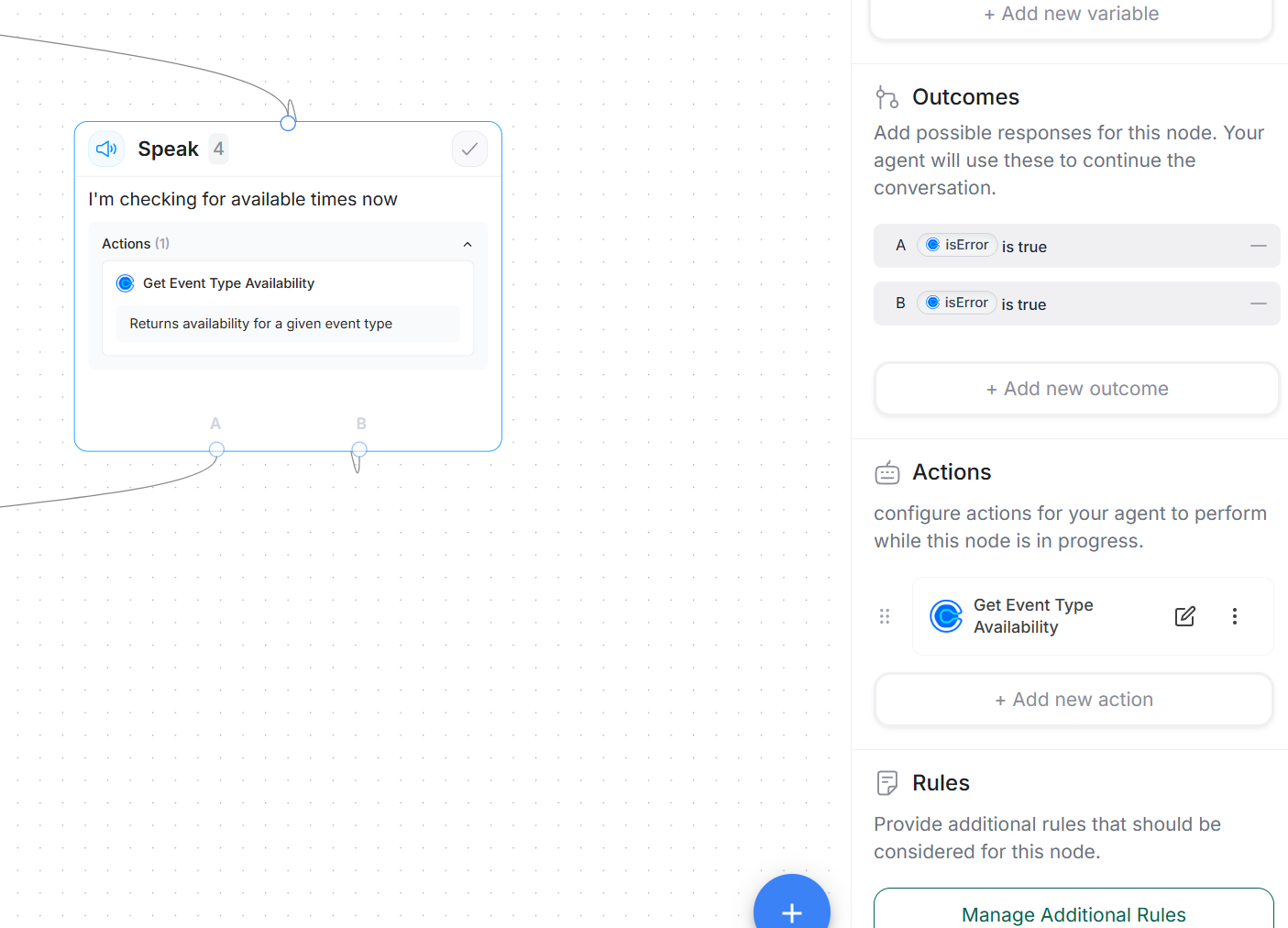
Trigger integrations mid-call so your agent can look up data, write records, and automate workflows. Add actions to a [Speak node](/agents/nodes#speak-node) to run them mid-call.
Add actions from a Speak node by opening **Actions** and clicking **+ Add new action**. Choose an integration, configure it, and reference your [Variables](/agents/variables) inside the action fields. If you have multiple accounts connected for the same integration, select which account to use in the **Account** tab.
Actions appear in a compact list view. Hover over an action to reveal the drag handle icon, which lets you reorder actions by dragging. Click anywhere on an action row to edit its configuration.
### Action display names
You can set a custom **Display Name** for each action to make your workflow easier to read and maintain. This label appears in the action list and helps you quickly identify what each action does, especially when you have multiple actions of the same type.
To set a display name:
1. Click on an action to open its configuration
2. Enter a name in the **Display Name** field at the top of the sidebar
3. The name will appear in the action list instead of the default integration action name
If no display name is set, the action shows its default integration name (for example "Send Email" or "Create Contact").
### Action ID reference
Each action has a unique identifier in the format `nodeId.actionId`. You can copy this ID using the copy button in the action header when viewing an action's configuration. Use this ID to reference specific action outputs in variables or outcomes.
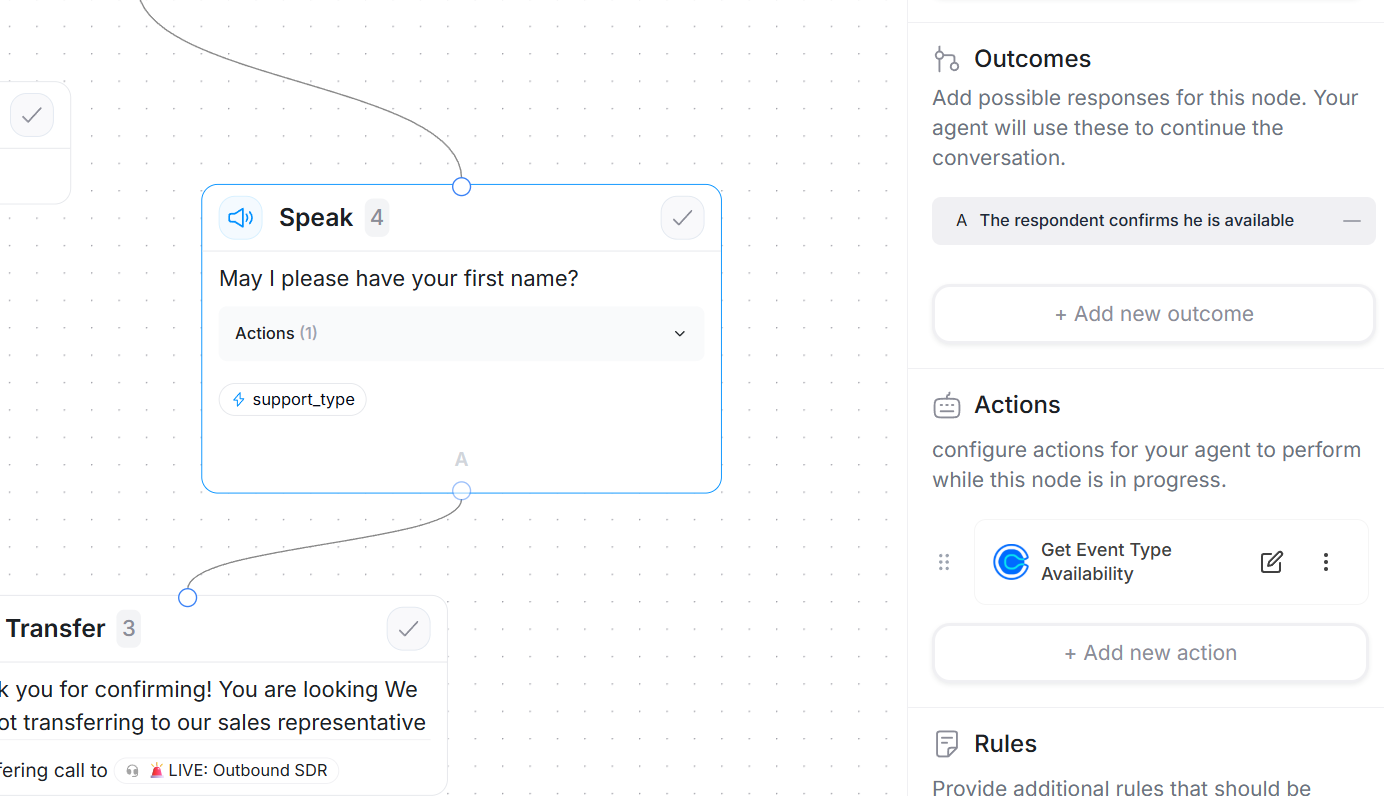 ## How mid-call actions change the flow
**Without actions:** caller responds -> variables extract -> outcomes evaluate -> next node.
**With actions:** the node auto-proceeds without waiting for another caller reply.
1. Agent speaks (Message or Prompt).
2. Action(s) run mid-call (interruptions disabled by default).
3. Variables update from action results.
4. Outcomes evaluate (rule-based outcomes recommended).
5. Next node executes.
Because the caller does not speak before outcomes fire, use rule-based outcomes that check action results (for example `lookup_found == true`, `action_status == "ok"`). Prompt-based outcomes do not automatically "see" internal values unless you surface them in the spoken conversation.
## Recommended patterns
### 1) Lookup -> Branch
**Goal:** Route based on CRM or API results.
* **Action:** CRM or webhook lookup using key fields (phone, email, account ID).
* **Variables:** `lookup_found` (boolean), `customer_id` (text).
* **Outcomes (rule-based):**
* `lookup_found == true` -> enriched path (use variables like `first_name`).
* `lookup_found == false` -> collect details before moving on.
### 2) Validate -> Retry loop
**Goal:** Ensure a required field is valid before proceeding.
* **Action:** Validator or API check (for example email verification).
* **Variables:** `email`, `email_valid` (boolean).
* **Outcomes (rule-based):**
* `email_valid == true` -> next step.
* Else -> self-loop to the node asking for email again (limit retries). See [Outcomes -> Loops](/agents/outcomes#loops-special-use-case).
### 3) Book -> Confirm
**Goal:** Schedule an appointment during the call.
* **Action:** Scheduler integration (calendar, booking tool).
* **Variables:** `timeslot_chosen`, `booking_status`.
* **Outcomes (rule-based):**
* `booking_status == "confirmed"` -> confirmation message then [Transfer](/agents/nodes#transfer-node) or [End](/agents/nodes#end-node).
* Else -> offer alternatives or transfer to a human.
```mermaid theme={null}
%%{init: {'theme':'base', 'themeVariables': { 'fontSize':'18px'}}}%%
graph TD
A["📅 Speak Node: Collect Appointment Time"] --> B["⚡ Action: Schedule Appointment"]
B --> C{"✓ Check booking_status"}
C -->|"✓ confirmed"| D["💬 Speak: Confirmation Message"]
C -->|"✗ failed/error"| E["💬 Speak: Offer Alternative Times"]
D --> F["✅ Transfer or End Call"]
E --> G["☎️ Transfer to Human"]
style A fill:#e3f2fd,stroke:#1976d2,stroke-width:4px,color:#000
style B fill:#fff3e0,stroke:#f57c00,stroke-width:4px,color:#000
style C fill:#f3e5f5,stroke:#7b1fa2,stroke-width:4px,color:#000
style D fill:#e8f5e9,stroke:#388e3c,stroke-width:4px,color:#000
style E fill:#ffebee,stroke:#d32f2f,stroke-width:4px,color:#000
style F fill:#e8f5e9,stroke:#388e3c,stroke-width:4px,color:#000
style G fill:#ffebee,stroke:#d32f2f,stroke-width:4px,color:#000
```
## Authoring tips
* **Interruptions:** Stay disabled by default for mid-call actions to prevent the caller from breaking the integration flow. If you enable interruptions, plan for partial inputs.
* **Speak node choice:** Use Message mode for fixed pre/post phrases. Use Prompt mode when the agent must compose dynamic summaries from action results.
* **Lean payloads:** Send only the variables you need. Clear, minimal fields reduce errors.
* **Preface long actions:** Add a short line like "One moment while I check that" before triggering an action to set caller expectations.
* **Structured outputs:** Set predictable fields (such as `action_status = "ok"` or `"error"`) to simplify rule checks.
## Error handling and resilience
Design outcomes for real-world hiccups:
* **Happy path:** `action_status == "ok"` will proceed.
* **Recoverable:** `action_status == "error"` will retry
* **Fallback:** persistent failure -> transfer to a human or offer a call-back.
* **Timeouts:** if an action exceeds your expected SLA, branch to a graceful message and continue.
## How mid-call actions change the flow
**Without actions:** caller responds -> variables extract -> outcomes evaluate -> next node.
**With actions:** the node auto-proceeds without waiting for another caller reply.
1. Agent speaks (Message or Prompt).
2. Action(s) run mid-call (interruptions disabled by default).
3. Variables update from action results.
4. Outcomes evaluate (rule-based outcomes recommended).
5. Next node executes.
Because the caller does not speak before outcomes fire, use rule-based outcomes that check action results (for example `lookup_found == true`, `action_status == "ok"`). Prompt-based outcomes do not automatically "see" internal values unless you surface them in the spoken conversation.
## Recommended patterns
### 1) Lookup -> Branch
**Goal:** Route based on CRM or API results.
* **Action:** CRM or webhook lookup using key fields (phone, email, account ID).
* **Variables:** `lookup_found` (boolean), `customer_id` (text).
* **Outcomes (rule-based):**
* `lookup_found == true` -> enriched path (use variables like `first_name`).
* `lookup_found == false` -> collect details before moving on.
### 2) Validate -> Retry loop
**Goal:** Ensure a required field is valid before proceeding.
* **Action:** Validator or API check (for example email verification).
* **Variables:** `email`, `email_valid` (boolean).
* **Outcomes (rule-based):**
* `email_valid == true` -> next step.
* Else -> self-loop to the node asking for email again (limit retries). See [Outcomes -> Loops](/agents/outcomes#loops-special-use-case).
### 3) Book -> Confirm
**Goal:** Schedule an appointment during the call.
* **Action:** Scheduler integration (calendar, booking tool).
* **Variables:** `timeslot_chosen`, `booking_status`.
* **Outcomes (rule-based):**
* `booking_status == "confirmed"` -> confirmation message then [Transfer](/agents/nodes#transfer-node) or [End](/agents/nodes#end-node).
* Else -> offer alternatives or transfer to a human.
```mermaid theme={null}
%%{init: {'theme':'base', 'themeVariables': { 'fontSize':'18px'}}}%%
graph TD
A["📅 Speak Node: Collect Appointment Time"] --> B["⚡ Action: Schedule Appointment"]
B --> C{"✓ Check booking_status"}
C -->|"✓ confirmed"| D["💬 Speak: Confirmation Message"]
C -->|"✗ failed/error"| E["💬 Speak: Offer Alternative Times"]
D --> F["✅ Transfer or End Call"]
E --> G["☎️ Transfer to Human"]
style A fill:#e3f2fd,stroke:#1976d2,stroke-width:4px,color:#000
style B fill:#fff3e0,stroke:#f57c00,stroke-width:4px,color:#000
style C fill:#f3e5f5,stroke:#7b1fa2,stroke-width:4px,color:#000
style D fill:#e8f5e9,stroke:#388e3c,stroke-width:4px,color:#000
style E fill:#ffebee,stroke:#d32f2f,stroke-width:4px,color:#000
style F fill:#e8f5e9,stroke:#388e3c,stroke-width:4px,color:#000
style G fill:#ffebee,stroke:#d32f2f,stroke-width:4px,color:#000
```
## Authoring tips
* **Interruptions:** Stay disabled by default for mid-call actions to prevent the caller from breaking the integration flow. If you enable interruptions, plan for partial inputs.
* **Speak node choice:** Use Message mode for fixed pre/post phrases. Use Prompt mode when the agent must compose dynamic summaries from action results.
* **Lean payloads:** Send only the variables you need. Clear, minimal fields reduce errors.
* **Preface long actions:** Add a short line like "One moment while I check that" before triggering an action to set caller expectations.
* **Structured outputs:** Set predictable fields (such as `action_status = "ok"` or `"error"`) to simplify rule checks.
## Error handling and resilience
Design outcomes for real-world hiccups:
* **Happy path:** `action_status == "ok"` will proceed.
* **Recoverable:** `action_status == "error"` will retry
* **Fallback:** persistent failure -> transfer to a human or offer a call-back.
* **Timeouts:** if an action exceeds your expected SLA, branch to a graceful message and continue.
 **Caller experience guardrails**
* Use **Uninterrupted message** for pre-action instructions so the agent is not cut off mid-sentence.
* For actions that take several seconds, add a short progress update after a couple of seconds to reduce perceived wait time.
## Data flow and variables
* Action outputs can set or update [Variables](/agents/variables) such as `customer_id`, `plan`, or `lookup_found`.
* These values are immediately available to rule-based outcomes in the same node.
* If you need AI to summarize results, surface key values verbally in a Prompt speak node after the action completes.
## Setup checklist (quick start)
* [ ] Open a [Speak node](/agents/nodes#speak-node)
* [ ] Click **Add action** and choose an integration
* [ ] Select which account to use (if you have multiple accounts for the same integration)
* [ ] Configure fields (URL, method, headers, body)
* [ ] Map your [Variables](/agents/variables) to action inputs
* [ ] Add rule-based [Outcomes](/agents/outcomes) that check action results
* [ ] Test the flow using [Test Agent](/agents/testing)
* [ ] Review action logs and outputs
* [ ] Verify error handling branches are in place
## Common mistakes to avoid
* Relying on prompt-based outcomes immediately after actions; they cannot see internal flags unless you speak them.
* Skipping error branches or default outcomes, which can stall the flow.
* Forgetting to cap retries or offer a human hand-off.
* Fetching more data than you need.
* Re-enabling interruptions and losing action results mid-flow.
## See also
* [Speak nodes](/agents/nodes#speak-node) - where actions live.
* [Variables](/agents/variables) - read and write values used by actions and rules.
* [Outcomes](/agents/outcomes) - build deterministic branches after actions.
* [Transfer node](/agents/nodes#transfer-node) - escalate on errors or high intent.
**Caller experience guardrails**
* Use **Uninterrupted message** for pre-action instructions so the agent is not cut off mid-sentence.
* For actions that take several seconds, add a short progress update after a couple of seconds to reduce perceived wait time.
## Data flow and variables
* Action outputs can set or update [Variables](/agents/variables) such as `customer_id`, `plan`, or `lookup_found`.
* These values are immediately available to rule-based outcomes in the same node.
* If you need AI to summarize results, surface key values verbally in a Prompt speak node after the action completes.
## Setup checklist (quick start)
* [ ] Open a [Speak node](/agents/nodes#speak-node)
* [ ] Click **Add action** and choose an integration
* [ ] Select which account to use (if you have multiple accounts for the same integration)
* [ ] Configure fields (URL, method, headers, body)
* [ ] Map your [Variables](/agents/variables) to action inputs
* [ ] Add rule-based [Outcomes](/agents/outcomes) that check action results
* [ ] Test the flow using [Test Agent](/agents/testing)
* [ ] Review action logs and outputs
* [ ] Verify error handling branches are in place
## Common mistakes to avoid
* Relying on prompt-based outcomes immediately after actions; they cannot see internal flags unless you speak them.
* Skipping error branches or default outcomes, which can stall the flow.
* Forgetting to cap retries or offer a human hand-off.
* Fetching more data than you need.
* Re-enabling interruptions and losing action results mid-flow.
## See also
* [Speak nodes](/agents/nodes#speak-node) - where actions live.
* [Variables](/agents/variables) - read and write values used by actions and rules.
* [Outcomes](/agents/outcomes) - build deterministic branches after actions.
* [Transfer node](/agents/nodes#transfer-node) - escalate on errors or high intent.